
Repeat-one is right twice
With repeat set to one, a track that reaches its end replays. Press Next and it advances. Those are two different intentions, and treating them as one is the most commonly reported bug class in music players.
Fadenza · macOS music player
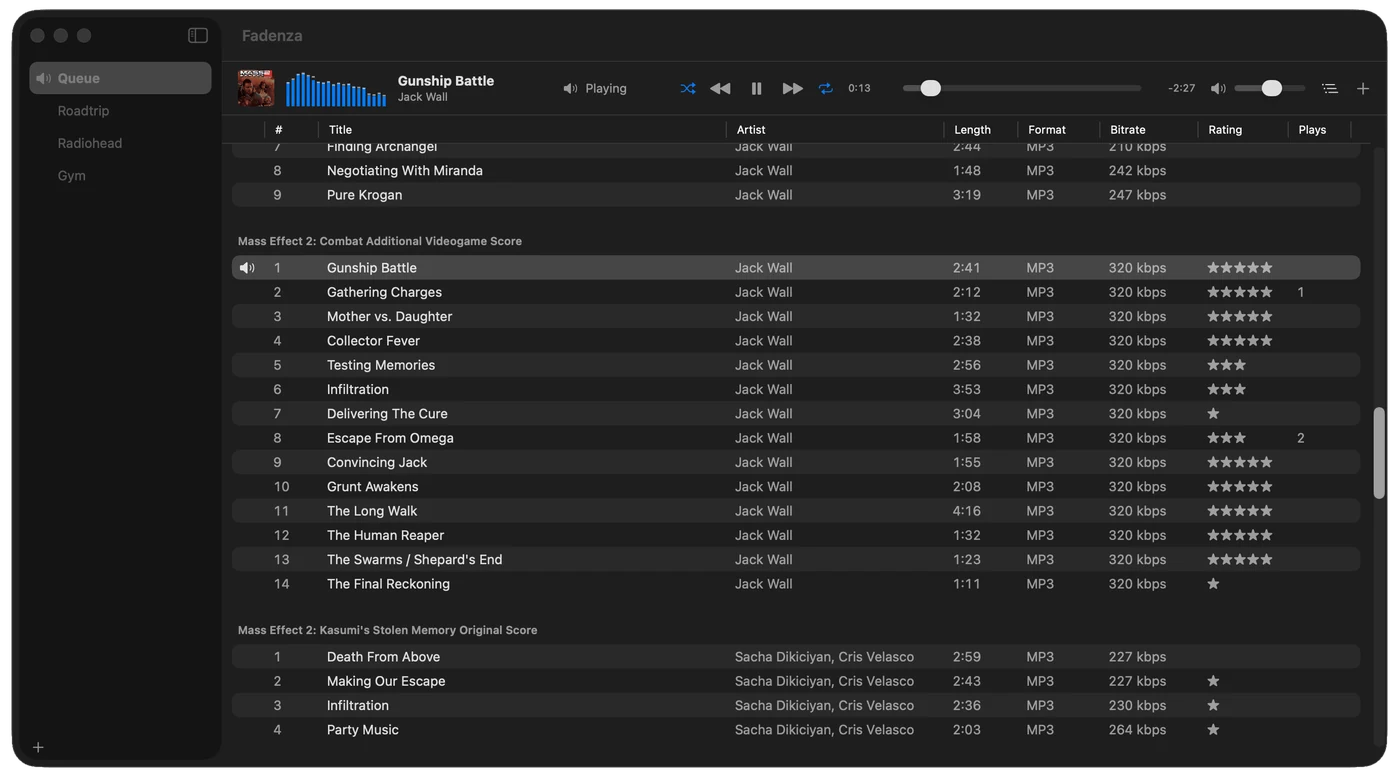
You hand it files, folders, playlists or stream URLs. It plays them in the order you chose, across as many lists as you keep. It remembers exactly where you were — down to the shuffle seed.
v1 is feature-complete and in private testing. Nothing to download yet.
Subtraction
Every one of these is something a competing player has. None of them is missing by accident, and this is the first thing you should read — if one of them is a dealbreaker, you have saved yourself a download.
Nothing to import into, nothing to scan, nothing to organize. Fadenza never moves your files and never writes to them — its sandbox entitlement is read-only.
Apple frameworks cannot write MP3, FLAC or Ogg tags. That was measured, not assumed. Rather than ship an editor that works for one format in seven, there is no editor.
Live albums and DJ mixes will click between tracks. The playback engine sits behind a protocol so this can be fixed later without disturbing anything else.
No hog mode, no DSD, no sample-rate following, no upsampling. Audio goes through the system mixer like everything else on the machine.
Nothing to sign into, nothing syncing. The only network traffic is the streams you point it at.
A fixed feature set. No component ecosystem, no effect chains, no crossfade, no pitch or speed control, no ReplayGain — and no equalizer. The player bar draws a meter that reads the audio; nothing in Fadenza filters it.
MP3, AAC/M4A, ALAC, WAV, AIFF, FLAC and Ogg Vorbis. No trackers, no chiptunes, no console audio — each of those needs a C decoder, and there are none here.
Up to sixty-four lists, each one named and filled by hand. Nothing generates them: no smart playlists, no rules, no auto-DJ, and no library behind them to draw from.
“Innovation is saying no to 1,000 things.” — Steve Jobs
Scope
Up to sixty-four, named as you like. One of them is the Queue — permanent, first in the list, and where everything that arrives without you asking lands: watched folders, the URL scheme, the control API. A drop goes wherever you dropped it. Drag a selection onto a list in the sidebar to copy it there, or hold ⌘ to move it. What you are looking at and what is playing are allowed to differ.
Play, pause, seek, volume, mute. Repeat off, one or all. Shuffle. App volume is its own level and never touches the system output. A live or chunked stream disables the scrubber rather than showing you one that silently does nothing.
Eleven columns you can reorder, resize and hide, from track number to bitrate to your own rating. Click a header and the list is physically reordered, not just redrawn. Group by album, artist or genre. Every row carries its state — loading, missing, unsupported, failed — with the reason behind it.
Local files and folders, recursive to 32 levels and 20,000 files per import. HTTP and HTTPS streams. M3U, M3U8 and PLS playlists, local or remote. Watched folders, with a dismissal set so a track you removed does not come back on the next scan.
Drag and drop, the Open panel, Finder’s Open With and file-type associations
all land in the list you are looking at — or, if you drop onto a sidebar row, in that
one. The fadenza:// URL scheme lands in the Queue instead, because any app
or web page on the machine can open a URL, and none of them should be able to write into
a list you curated by hand. An import never aborts on one bad file: the rest goes in and
you are told what was rejected.
Title, artist, album, track number, genre, duration, artwork. Read-only. Loaded after the list populates, so paths appear immediately and titles fill in behind them.
Now Playing and media keys through the system’s own command centre — no private APIs, no global event taps. Eight transport actions take a keyboard shortcut you choose, and each one can be made global, so ⌃⌥] skips a track without your leaving whatever you were doing — and no Accessibility permission is asked for, because those combinations are registered rather than watched for. Dock menu and a menu bar extra. Output device selection, including aggregate and multi-output devices.
Labels on every control, real list rows with stable identifiers so VoiceOver navigation works, and a scrubber that speaks elapsed-of-duration. Reduce Motion and Increase Contrast are respected.
Behaviour
None of these is a feature you would put on a box. All of them are the reason a player either feels correct or quietly annoys you for years.
With repeat set to one, a track that reaches its end replays. Press Next and it advances. Those are two different intentions, and treating them as one is the most commonly reported bug class in music players.
Fadenza builds a seeded permutation of the playlist — no repeats within a pass, and reproducible. The seed is saved with the session, so reopening resumes the same order it would have played rather than reshuffling behind your back.
More than three seconds into a track, Previous seeks back to the start. Less than that, it moves to the previous track.
Playlist order, current track, position, repeat mode, shuffle state and seed, volume, mute, output device, watched folders. Reopen Fadenza and it is exactly where you left it — stopped, waiting, never playing at you.
Stars and play counts are keyed to the audio itself, by a sampled hash of its contents rather than by its place in a list. Remove a track and add it back, rename it, move it to another drive, put it in three playlists — it is the same four stars each time.
AppleScript, Shortcuts, the loopback HTTP API and MCP all enter through the same command layer. No integration reaches into another’s state. Remove any one of them and nothing else notices. Media keys reach the player directly through the system’s Now Playing machinery, which is the route Apple requires for them.
No Swift packages, no CocoaPods, no vendored C, no bundled decoders. Apple frameworks and Swift, sandboxed from the first commit, shipped as a universal binary.
The format support table is produced by a probe that runs against the operating system and re-runs whenever macOS changes. It is also why there is no tag editor: the probe proved Apple frameworks cannot write MP3, FLAC or Ogg tags, so the feature was dropped rather than faked.
Competitors
Fadenza is narrow on purpose. Being clear about where it is not the answer is cheaper for everyone than finding out after installing it.
All of them, side by side, on the competitors page.
Status
v1 is feature-complete and in private testing. Nothing to download yet. The capability probe passes for all seven formats on macOS 26, and the project builds as five targets whose dependencies point one way only. The first release will be private.